Making sense of the noise - decoding LS-CAN frames
Where we left off
At the end of the previous post we had a working sniffer: live frames appearing on screen, new IDs popping up at the bottom of the grid, changed bytes highlighted in each row.
The next step - and honestly the most time-consuming part of this whole project - was turning that noise into meaning. This post is about how we did that, and what the end result looks like as a machine-readable signal catalog. All examples below are decoded from a real CAN_LS.LOG capture file, attached alongside the YAML.
The log format
Before decoding anything, it helps to understand the raw data format the sniffer writes. Each received frame appears as one CSV line:
timestamp_us,bus,direction,id,dlc,byte0,byte1,...
For example:
33041336,LS-CAN,RX,0x445,2,00,7B
This means: at 33,041,336 microseconds (about 33 seconds) after boot, the LS-CAN bus received frame 0x445 with 2 bytes of payload: 0x00 and 0x7B. Everything else in this post is decoded from lines that look exactly like that.
The core methodology: poke and watch
CAN reverse engineering is, at its heart, a very simple game. You perform a single, isolated action - press one button, open one door, turn one switch - and you watch the sniffer to see which frame IDs change and exactly which bytes inside those frames flip. Then you write it down, repeat with the next action, and gradually build a map.
The trick is discipline. The car is constantly broadcasting tens of frames per second across dozens of IDs. If more than one value changes its state in the same moment, you end up with two columns of changes and no idea which one caused which.
Our workflow looked like this:
- Start the sniffer, wait a few seconds for the bus to settle into its idle pattern.
- Perform one action (e.g. push the left blinker stalk).
- Note every ID that showed a highlighted (changed) byte.
- Immediately perform the reverse action (cancel the blinker).
- Record which bytes returned to their previous values.
- Add an entry - or update an existing one - on paper first, then in the YAML catalog.
- Repeat.
Sounds tedious. It is. I tracked around 15 IDs across two evenings of sitting in the car. The remaining IDs are still partially or completely unknown.
The catalog format
Everything we discovered lives in LS_CAN_IDS.yaml, attached to this post. Rather than a flat list of notes, it is structured so that a script can later auto-generate C headers from it directly. Here is the full schema for one frame entry:
- id: "0x260"
  name: "BlinkerStatus"
  dlc: 3
  description: "Turn indicator operating mode."
  signals:
    - name: "BlinkerModeCode"
      byte: 0
      mask: 0xFF
      value_mapping:
        0:  "No blinkers"
        37: "Left blinker"
        58: "Right blinker"
        31: "Hazard lights"
  examples:
    - value: "0x004080"
      description: "No blinkers"
    - value: "0x254080"
      description: "Left blinker"
The id is the 11-bit CAN arbitration ID in hex. The dlc is the data length code - how many bytes are in the payload. Each item in signals describes one piece of information packed inside that payload. The examples are real bus captures that let you sanity-check your decoder without needing the car present.
The signal fields map directly to the four steps needed to decode any value:
| Field | What it does |
|---|---|
byte |
Which byte (zero-indexed) to start reading from |
byte_count |
How many consecutive bytes the value spans (defaults to 1) |
mask |
Bitmask that isolates just this signal's bits within those bytes |
factor |
Multiply the masked integer by this to get the physical value |
offset |
Add this after multiplying (shifts the zero point - used for temperatures) |
endian |
big means the first byte is the most-significant byte; default is little-endian |
value_mapping |
Lookup table - raw integer → human-readable label |
Decoding signals - the four-step formula
Every signal decode, no matter how exotic, reduces to the same four operations:
Step 1 - extract bytes. Take byte_count bytes starting at byte. If byte_count > 1, assemble them into an integer respecting endian.
Step 2 - mask. Apply & mask to isolate the bits belonging to this signal.
Step 3 - scale. Multiply by factor and add offset.
Step 4 - lookup. If value_mapping exists, use the result of step 2 (before scaling) as the key.
Let us walk through some real examples, each decoded directly from a line in the log.
Example 1: outdoor temperature - the simple case
From the log, at t ≈ 33.0 s:
33041336,LS-CAN,RX,0x445,2,00,7B
The catalog says OutdoorTempRaw is at byte: 1, mask: 0xFF, factor: 0.5, offset: -40.
- Extract:
data[1] = 0x7B = 123. - Mask:
123 & 0xFF = 123(full byte, mask does nothing here). - Scale:
123 × 0.5 + (−40) = 61.5 − 40 = 21.5 °C.
Twenty-one and a half degrees. The session was recorded on a warm afternoon.
Frame 0x445 repeats roughly every second in the log. We watched it for a while - it never changed. Suspicion confirmed: the outdoor temperature sensor updates at ~1 Hz, which is plenty fast enough for anything this car actually needs to do with that number.
The coolant temperature in frame 0x145 works identically but with factor: 1, offset: -40 - so it is just raw − 40. The −40 offset lets the ECU express temperatures from −40 °C (raw 0x00) to +215 °C (raw 0xFF) in a single unsigned byte without needing a sign bit.
Example 2: the odometer - 32-bit big-endian
From the log, every ~1000 ms:
33040265,LS-CAN,RX,0x190,5,00,01,40,FE,80
The OdometerRaw signal spans bytes 1–4, big-endian, with factor: 0.015625 (which is 1/64).
- Extract bytes 1-4 big-endian:
0x01, 0x40, 0xFE, 0x80 = 0x0140FE80 = 20971136 - Scale:
20971136 × 0.015625 = 327,674 km
This car has driven 327,674 km. That is the actual odometer of the vehicle the log was captured from. The value never changed during the session - the car was stationary.
From YAML to C - no manual headers
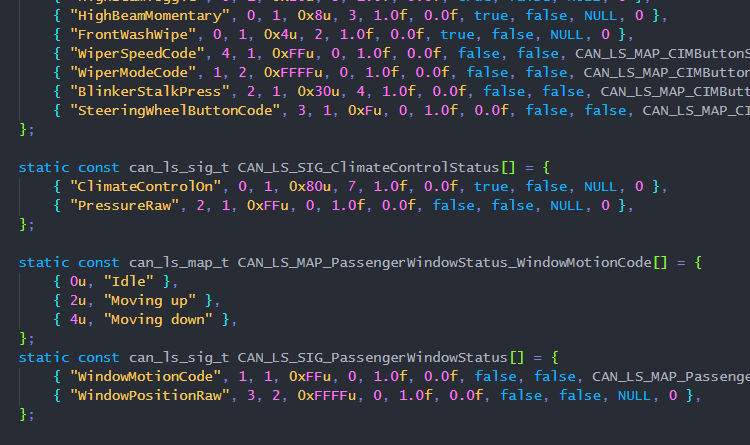
Once a signal is documented in the YAML, a Python code-generation script converts the entire catalog into can_ls_signals_gen.h - a static array of can_ls_sig_t structs, one per signal per frame:
/* Frame 0x108 — EngineStatus */
static const can_ls_sig_t CAN_LS_SIG_EngineStatus[] = {
    { "EngineStateCode", 0, 1, 0xFFu,   0, 1.0f,  0.0f, false, false, CAN_LS_MAP_EngineStatus_EngineStateCode, 4 },
    { "EngineRPMRaw",    1, 2, 0xFFFFu, 0, 0.25f, 0.0f, false, true,  NULL, 0 },
    { "VehicleSpeedRaw", 4, 1, 0xFFu,   0, 2.0f,  0.0f, false, false, NULL, 0 },
};
The columns are: name, start byte, byte count, mask, bit shift, factor, offset, is-flag, is-big-endian, value-map pointer, map length.
The dashboard reads any signal by name at runtime:
const can_ls_sig_t *sig = can_ls_sig_by_name(&CAN_LS_FRAMES[slot], "EngineRPMRaw");
float rpm = can_ls_read_phys(cache[slot].data, cache[slot].dlc, sig);
Adding a newly-decoded signal to the YAML and running codegen makes it immediately available in C. There is no header to hand-edit and no copy-paste mistake to introduce.
What we still do not know
The catalog is incomplete. Several frame IDs broadcast regularly but their contents have not been correlated with any observable action yet:
0x090- 2 bytes, observed values0x2200and0x0200, period unknown.0x140- 1 byte, toggles between0x00and0x80under unknown conditions.0x220,0x270,0x315,0x330,0x340- periodic frames with stable or slowly-changing bytes.0x621-0x629- a cluster of 8-byte frames in the high range. Frame0x621changes content early in boot, and0x622changes alongside the door events, but the exact bit meanings have not been mapped.
The full catalog
The attached LS_CAN_IDS.yaml and CAN_LS.LOG are the complete catalog and a real capture session as of this post. Open both alongside this article - pick any line from the log, find its frame ID in the YAML, and walk the four decode steps. Everything in the dashboard firmware: RPM arc, speed arc, temperature labels, light icons, door indicators, blinker flashes, steering wheel button highlights - is read through exactly the signal definitions in that YAML file.
Next up: the dashboard itself.