KubiSat firmware architecture
How the KubiSat firmware is structured on the dual-core RP2040 - boot sequence, framed text protocol over LoRa and UART, system state, power, events, telemetry, sensors, RTC and GPS.

The firmware runs on an RP2040 inside a 1U CubeSat model. Both cores are used: core 0 handles communication (receiving, parsing and answering frames), core 1 collects GPS and telemetry data and writes it to the SD card. Everything is written in C++ on top of the Pi Pico SDK and built with CMake from Visual Studio Code.
Boot sequence
The startup is split into deliberately small steps so a failure in any one of them is easy to spot in the logs:
- Hardware init -
stdio_init_all(), UART0 (debug/comms) and UART1 (GPS), GPIO including the status LED, both I2C buses (i2c0for INA3221 and RTC,i2c1for the environmental sensors), GPS and sensor power rails on,SystemStateManagerinstantiated,GPSEvent::POWER_ONemitted. - Peripherals - radio brought up and its status stored, SD card mounted and verified, log file created on the card if available, environmental and light sensors initialized. All init flags land in the state manager. A confirmation frame is sent over the radio.
- Operating mode detection - the power manager is configured, battery voltage and current are read, the source is identified (USB or battery), and the corresponding mode is set in
SystemStateManager. - Second core -
core1_entry()runs the GPS collector, the telemetry loop and the bootloader-reset request handler. - Finalization - a status frame is sent, an "init done" event is logged with a timestamp, and the main loop on core 0 starts.
Communication model
The model needs to send telemetry, change configuration and receive commands, but the user must never be able to put the system into an undefined state. Everything happens through a command table - each command has explicit access rights (read, write, or both) and a single handler.
There are two interfaces:
- UART (uart0, 115200 baud) - local, used for development, debugging and (optionally) feeding GPS data through to u-center via passthrough mode.
- LoRa SX1278 - remote half-duplex link, uses an exclusive
spi0at 8 MHz, driven by thepico-loralibrary.
Both interfaces accept and produce the same framed text protocol. Responses are routed back to whichever interface received the request. UART access is guarded by a mutex so both cores can write to it safely; each log line is prefixed with a millisecond timestamp and the originating core ID and colored by log level (ERROR red, WARNING yellow, INFO green, DEBUG blue).
Frame structure
A frame is a semicolon-separated text record bracketed by a fixed prefix and suffix:
KBST;<direction>;<op>;<group>;<command>;<value>;<unit>;TSBK
| Field | Format | Meaning |
|---|---|---|
| Header | KBST |
Frame start marker |
| Direction | 0/1 |
0 = ground → satellite, 1 = satellite → ground |
| Operation | GET/SET/RES/VAL/ERR/SEQ |
Frame type |
| Group | 0-10 | Subsystem ID |
| Command | 0-10 | Command ID within the group |
| Value | string | Parameters or response data |
| Unit | string | Optional unit (V, mA, s, ...) |
| Footer | TSBK |
Frame end marker |
LoRa caps a packet at 255 bytes. After protocol overhead about 235 bytes are usable for payload. When the answer is larger (event log dumps, for example) it is split into SEQ frames followed by a final VAL with the value SEQ_DONE. Operation types:
| Op | Description |
|---|---|
| GET | Request a value (sent by ground) |
| SET | Request a parameter change |
| RES | Acknowledge a SET |
| VAL | Carry the value of a GET answer |
| SEQ | One chunk of a multi-frame answer |
| ERR | Operation failed; value is a short error code |
A few example frames:
KBST;0;GET;1;1;;TSBK            -> read firmware version
KBST;0;SET;7;1;1;TSBK           -> GPS power on
KBST;1;VAL;3;4;25.25;C;TSBK     -> RTC die temperature = 25.25 °C
KBST;1;ERR;3;0;INVALID_FORMAT;;TSBK
Receive pipeline
The receive path is the same shape for both interfaces, just with different sources of the input buffer:
- The main loop polls the LoRa module and the UART.
- On a LoRa packet,
on_receive(packet_size)reads raw bytes, sanity-checks the length (<= MAX_PACKET_SIZE), and hands the buffer toprocess_lora_packet(). process_lora_packet()strips the first two address bytes, checks that the destination matches the local address and the source matches the expected remote, and passes the rest toextract_and_process_frames().- UART data takes a slightly different shape:
handle_uart_input()buffers characters until\ror\n, then forwards the line. extract_and_process_frames()scans forKBST/TSBKpairs and feeds each frame toframe_process().frame_process()decodes the frame, builds a command key out ofgroupandcommand, and callsexecute_command().execute_command()looks up the handler incommand_handlers, calls it with the operation and the value, and the handler returns one or more response frames.- Each response frame is re-encoded and sent back on the interface that the request came in on.
Command groups
| Group | Subsystem |
|---|---|
| 1 | System diagnostics |
| 3 | Clock |
| 5 | Event log |
| 7 | GPS |
| 8 | Telemetry |
System state manager
SystemStateManager is a singleton that holds every flag that more than one subsystem needs to see:
bool pending_bootloader_reset;
bool gps_collection_paused;
bool sd_card_mounted;
VerbosityLevel uart_verbosity;
bool sd_card_init_status;
bool radio_init_status;
bool light_sensor_init_status;
bool env_sensor_init_status;
recursive_mutex_t mutex_;
All access goes through the mutex - it is a recursive one because some code paths need to re-enter while already holding it.
At startup the power readings decide whether the model is in ground mode (USB connected) or flight mode (running on battery). In ground mode every command is allowed; in flight mode a few destructive ones - like turning the GPS off - are blocked.
The diagnostics group exposes the basics:
| ID | Frame | Description |
|---|---|---|
| 1.0 | KBST;0;GET;1;0;;TSBK |
List every available command |
| 1.1 | KBST;0;GET;1;1;;TSBK |
Firmware version |
| 1.2 | KBST;0;GET;1;2;;TSBK |
Current mode (USB / battery) |
| 1.3 | KBST;0;GET;1;3;;TSBK |
Uptime in seconds |
| 1.8 | GET/SET 1;8 |
Read/write UART log verbosity (0-4) |
| 1.9 | KBST;0;SET;1;9;USB;TSBK |
Reboot into USB bootloader |
Power manager
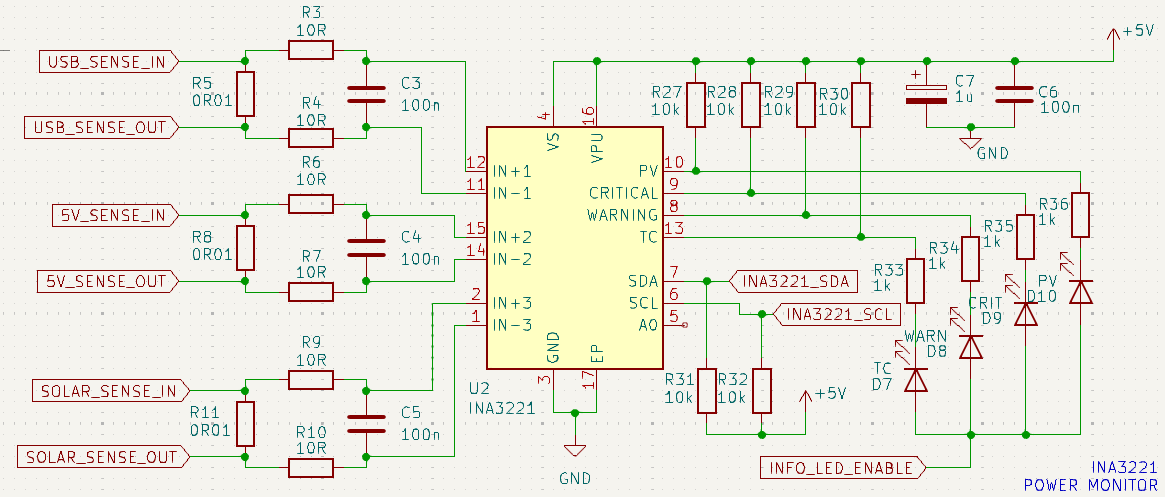
PowerManager is the only piece of code that talks to the INA3221 directly. It exposes battery voltage, 5 V rail voltage and the three current channels, behind a recursive mutex (powerman_mutex_) because both cores read these values. The class constructor takes an i2c_inst_t*, so the same code can be used on either I2C bus if the wiring ever changes.
class PowerManager {
private:
    INA3221 ina3221_;
    bool initialized_;
    recursive_mutex_t powerman_mutex_;

    static constexpr float SOLAR_CURRENT_THRESHOLD  = 50.0f;
    static constexpr float USB_CURRENT_THRESHOLD    = 50.0f;
    static constexpr float BATTERY_LOW_THRESHOLD    = 2.8f;
    static constexpr float BATTERY_FULL_THRESHOLD   = 4.2f;
Initialization reads the manufacturer and die IDs to confirm the chip is the expected one, then sets the under-/over-voltage alarm thresholds (VOLTAGE_LOW_THRESHOLD, VOLTAGE_OVERCHARGE_THRESHOLD). A configure() method takes a std::map of parameter names so the conversion mode and sample averaging can be changed at runtime over a SET command.
Event manager
The event subsystem records anything noteworthy that happens on the satellite: boot, shutdown, power transitions, GPS power changes, clock updates. Each entry is small on purpose:
class EventLog {
public:
    uint32_t timestamp;  // Unix timestamp
    uint16_t id;         // monotonic ID
    uint8_t  group;      // SYSTEM, POWER, ...
    uint8_t  event;      // specific event type
} __attribute__((packed));
8 bytes per entry means a lot can fit in RAM. Events live in a circular buffer in RAM and are flushed to the SD card either every N entries or immediately when a power-related event arrives (because those are the ones you most want to survive a brown-out).
Groups and types are split into nested enums so adding a new event type is a one-line change in a single header:
enum class EventGroup : uint8_t {
    SYSTEM = 0x00,
    POWER  = 0x01,
    COMMS  = 0x02,
    GPS    = 0x03,
    CLOCK  = 0x04
};

enum class SystemEvent : uint8_t {
    BOOT           = 0x01,
    SHUTDOWN       = 0x02,
    WATCHDOG_RESET = 0x03,
    CORE1_START    = 0x04,
    CORE1_STOP     = 0x05
};
Subsystems generate events through EventEmitter::emit(...), which forwards into EventManager::log_event(). The latter grabs eventMutex, fetches the current Unix time from the DS3231, writes the entry, advances the circular write index and, depending on the flush rule, either keeps going or saves the buffer to the card.
Events are also exposed remotely:
| ID | Frame | Description |
|---|---|---|
| 5.1 | KBST;0;GET;5;1;[N];TSBK |
Last N events; N=0 means "everything" |
| 5.2 | KBST;0;GET;5;2;;TSBK |
Total count of events in the log |
Telemetry manager
TelemetryManager is the central recorder. It writes two types of records, both convertible to CSV with a to_csv() method:
TelemetryRecord- timestamp, firmware version, the five INA3221 currents/voltages and the GPS RMC + GGA fields (time, latitude, lat dir, longitude, lon dir, speed, course, date, fix quality, satellite count, altitude).SensorDataRecord- timestamp, temperature, pressure, humidity, light level.
At init time the manager grabs its mutex, checks that the SD is mounted, and either creates /telemetry.csv and /sensors.csv with the header row or wipes the existing ones.
collect_telemetry() runs on core 1 once per DEFAULT_SAMPLE_INTERVAL_MS (1 s by default). It:
- Reads the current time from the DS3231 - this is the row's timestamp.
- Calls
collect_power_telemetry(), which goes throughPowerManagerfor the voltages and currents. - Emits power-related events when relevant (USB plugged in, solar charging starts, battery low).
- Calls
collect_gps_telemetry(), which reads the lastNMEADataRMC and GGA tokens. - Calls
collect_sensor_telemetry(), which goes throughSensorWrapperfor the environmental data.
Records land in two fixed-size circular buffers (default TELEMETRY_BUFFER_SIZE = 20). When eventsSinceFlush hits DEFAULT_FLUSH_THRESHOLD (default 10), flush_telemetry() writes both buffers to the SD card as CSV rows. Everything is gated by telemetry_mutex so reads from the ground link cannot race with the writer on core 1.
Ground access:
| ID | Frame | Description |
|---|---|---|
| 8.2 | KBST;0;GET;8;2;;TSBK |
Last telemetry record (CSV) |
| 8.3 | KBST;0;GET;8;3;;TSBK |
Last sensor record (CSV) |
File system
The SD layer is built on top of pico-vfs, which gives a POSIX-style API over a virtual file system on the RP2040. fs_init() creates a block device, an FAT filesystem on top of it, mounts the device at / and falls back to a format-and-remount if the initial mount fails:
bool fs_init(void) {
    blockdevice_t *sd = blockdevice_sd_create(SD_SPI_PORT,
                                              SD_MOSI_PIN,
                                              SD_MISO_PIN,
                                              SD_SCK_PIN,
                                              SD_CS_PIN,
                                              24 * MHZ,
                                              false);
    filesystem_t *fat = filesystem_fat_create();

    int err = fs_mount("/", fat, sd);
    if (err == -1) {
        err = fs_format(fat, sd);
        if (err == -1) {
            return false;
        }
        err = fs_mount("/", fat, sd);
    }
    return err != -1;
}
The mount status feeds back into SystemStateManager via set_sd_card_mounted(true). Both the telemetry and event subsystems use the same file system underneath.
Sensors
The sensor subsystem lives behind a tiny abstract interface:
class ISensor {
public:
    virtual ~ISensor() = default;
    virtual bool init() = 0;
    virtual float read_data(SensorDataTypeIdentifier type) = 0;
    virtual bool is_initialized() const = 0;
    virtual SensorType get_type() const = 0;
    virtual bool configure(const std::map<std::string, std::string>& config) = 0;
    virtual uint8_t get_address() const = 0;
};
Concrete classes (BME280, BH1750) handle the low-level I2C transactions and the per-chip math. They are then wrapped (BME280Wrapper, BH1750Wrapper) so they conform to ISensor. A SensorWrapper singleton holds a map of SensorType -> ISensor*.
bool SensorWrapper::sensor_init(SensorType type, i2c_inst_t* i2c) {
    switch (type) {
    case SensorType::LIGHT:
        sensors[type] = new BH1750Wrapper(i2c);
        break;
    case SensorType::ENVIRONMENT:
        sensors[type] = new BME280Wrapper(i2c);
        break;
    default:
        return false;
    }
    return sensors[type]->init();
}
The BME280 wrapper reads all raw values in one transaction and converts on demand, because the I2C transaction itself is the expensive part. The BH1750 has internal lux conversion, so it is just two bytes plus a multiplier, with a runtime-selectable mode through configure(). Default is continuous high-resolution.
Two data type enums keep the API self-describing:
enum class SensorType : uint8_t {
    NONE = 0x00,
    LIGHT = 0x01,
    ENVIRONMENT = 0x02,
};

enum class SensorDataTypeIdentifier : uint8_t {
    NONE = 0x00,
    LIGHT_LEVEL = 0x01,
    TEMPERATURE = 0x02,
    HUMIDITY = 0x03,
    PRESSURE = 0x04,
};
Clock
DS3231 is a thin I2C abstraction on top of the RTC chip. It exposes get_time()/set_time() (which convert between BCD and binary), a get_local_time() that applies a configurable timezone offset, and get_temperature(). The chip uses BCD internally; get_time() builds a struct tm, converts it with mktime() and returns a time_t:
time_t DS3231::get_time() {
    uint8_t time_data[7];
    if (i2c_read_reg(DS3231_SECONDS_REG, 7, time_data) != 0) {
        uart_print("Failed to read time from RTC", VerbosityLevel::ERROR);
        return -1;
    }

    struct tm timeinfo = {};
    timeinfo.tm_sec  = ((time_data[0] >> 4) * 10) + (time_data[0] & 0x0F);
    timeinfo.tm_min  = ((time_data[1] >> 4) * 10) + (time_data[1] & 0x0F);
    timeinfo.tm_hour = ((time_data[2] >> 4) * 10) + (time_data[2] & 0x0F);
    timeinfo.tm_mday = ((time_data[4] >> 4) * 10) + (time_data[4] & 0x0F);
    timeinfo.tm_mon  = (((time_data[5] & 0x1F) >> 4) * 10) + (time_data[5] & 0x0F) - 1;
    timeinfo.tm_year = ((time_data[6] >> 4) * 10) + (time_data[6] & 0x0F) + 100;
    timeinfo.tm_isdst = 0;
    ...
}
Clock commands:
| ID | Frame | Description |
|---|---|---|
| 3.0 | GET/SET 3;0 |
Read/write current time (Unix timestamp) |
| 3.1 | GET/SET 3;1 |
Read/write timezone offset in minutes (-720 to +720) |
| 3.4 | KBST;0;GET;3;4;;TSBK |
DS3231 internal temperature (°C) |
GPS and NMEA
The GPS subsystem is built around three pieces: the NEO-6M itself (UART), a collect_gps_data() collector that runs on core 1, and an NMEAData singleton that holds the parsed tokens.
Two NMEA sentences are kept: GPRMC (time, date, position, speed, course) and GPGGA (fix quality, satellite count, altitude). Example RMC:
$GPRMC,123519,A,4807.038,N,01131.000,E,022.4,084.4,230394,003.1,W*6A
Fields: 12:35:19 UTC, status A (active), 48° 07.038' N, 11° 31.000' E, 22.4 knots, course 84.4°, 23 March 1994, magnetic variation 3.1° W, checksum *6A.
The collector reads UART bytes into a buffer, splits on \r/\n, tokenizes on , and dispatches based on the sentence prefix:
void collect_gps_data() {
    if (SystemStateManager::get_instance().is_gps_collection_paused()) {
        return;
    }

    std::array<char, MAX_RAW_DATA_LENGTH> raw_data_buffer;
    static int raw_data_index = 0;

    while (uart_is_readable(GPS_UART_PORT)) {
        char c = uart_getc(GPS_UART_PORT);

        if (c == '\r' || c == '\n') {
            if (raw_data_index > 0) {
                raw_data_buffer[raw_data_index] = '\0';
                std::string message(raw_data_buffer.data());
                raw_data_index = 0;

                std::vector<std::string> tokens = splitString(message, ',');

                if (message.find("$GPRMC") == 0) {
                    NMEAData::get_instance().update_rmc_tokens(tokens);
                } else if (message.find("$GPGGA") == 0) {
                    NMEAData::get_instance().update_gga_tokens(tokens);
                }
            }
        } else {
            if (raw_data_index < MAX_RAW_DATA_LENGTH - 1) {
                raw_data_buffer[raw_data_index++] = c;
            } else {
                raw_data_index = 0;
            }
        }
    }
}
NMEAData is protected by its own mutex because the collector on core 1 writes to it while the telemetry collector and the comms layer on core 0 read from it.
GPS commands
| ID | Frame | Description |
|---|---|---|
| 7.1 | GET 7;1 |
Read GPS power state |
| 7.1 | SET 7;1;POWER |
Set GPS power (0/1) - blocked in flight mode |
| 7.2 | SET 7;2;TIMEOUT |
Enter UART passthrough for the GPS for TIMEOUT seconds |
The SET handler for 7.1 runs through:
- If we are in battery (flight) mode, return
INVALID_OPERATION. - If the value is empty, return
PARAM_REQUIRED. - Parse the value as integer; if it is not
0or1, returnPARAM_INVALID. - Drive the GPS EN pin to the requested state.
- Emit
POWER_ONorPOWER_OFF. - Return a RES frame with the new state.
The GET handler refuses non-empty parameters with PARAM_UNNECESSARY, otherwise it reads the EN pin and returns it.
GPS UART passthrough
handle_enable_gps_uart_passthrough() connects the GPS UART directly to the debug UART so the module can be configured from u-center. It is only allowed in ground mode because the regular GPS collector has to be paused for the duration. The handler:
- Refuses anything other than a SET.
- Refuses to run on battery.
- Parses and validates the timeout (default 60 s).
- Configures the exit sequence (
##EXIT##). - Pauses GPS collection.
- Emits a "passthrough started" event.
- Switches the debug UART baud rate to the GPS baud rate.
- Pipes bytes between the two UARTs until timeout or until the exit sequence is seen.
- Restores the original baud rate.
- Resumes GPS collection.
- Emits a "passthrough ended" event.
- Returns a RES frame.
What I'd do differently next time
The biggest pieces I'd swap in are:
- FreeRTOS instead of the manual two-core split. The current design works, but a proper scheduler would make priorities and timing easier to reason about.
- Power-save modes between samples. At 1 Hz telemetry there is a lot of idle time the RP2040 could spend in a lower-power state.
- An access control layer on the comms protocol so not every operator can SET every parameter.
- A file-fetch command so the SD card can be read out in flight without writing a new handler for every file.